Voici une version professionnelle en français et en anglais.
🇫🇷 🛒 Tan Superette UI
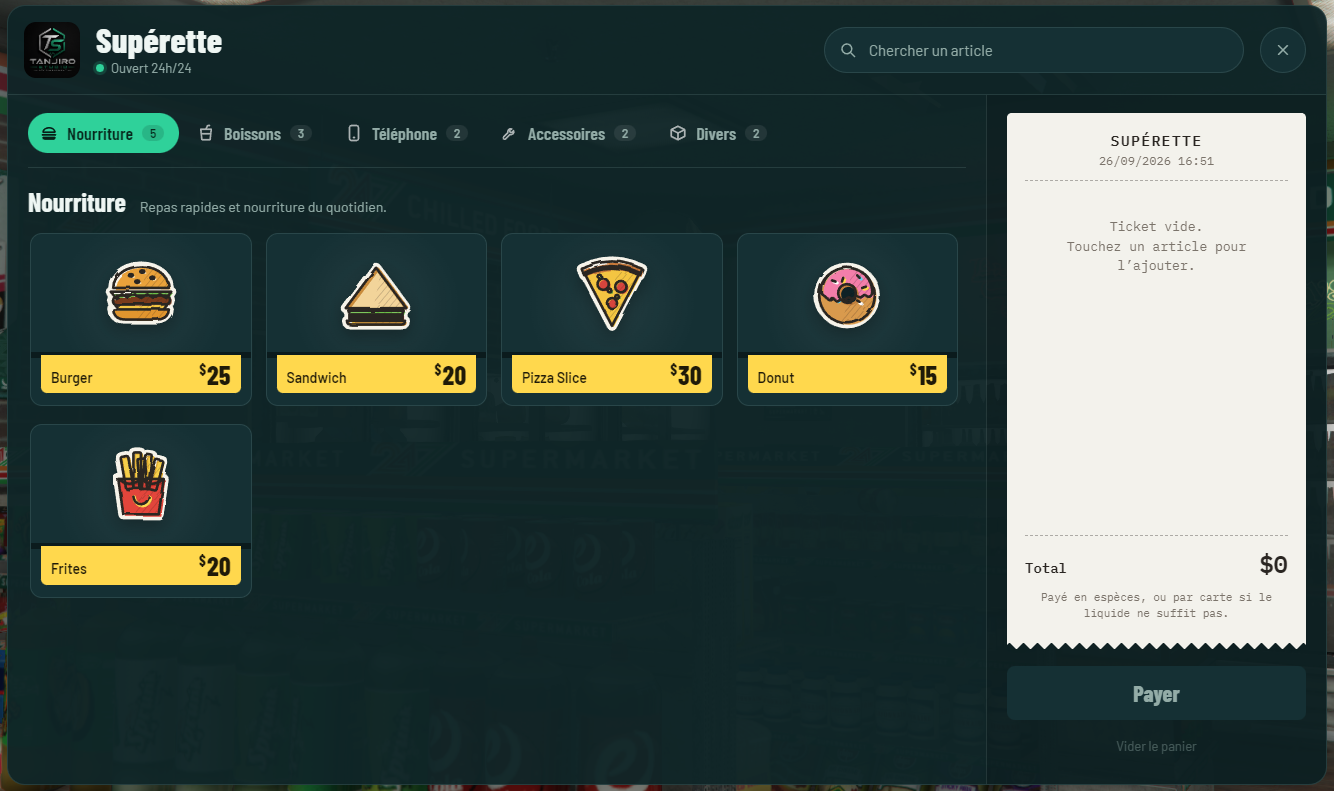
Une supérette moderne avec une interface NUI immersive, conçue pour les serveurs FiveM souhaitant remplacer les menus classiques par une expérience utilisateur plus moderne.
✨ Fonctionnalités
- ✅ Interface UI moderne, fluide et responsive
- ✅ Aperçu visuel des articles
- ✅ Catégories de produits
- ✅ Barre de recherche rapide
- ✅ Compatible ESX Legacy
- ✅ Compatible ox_inventory
- ✅ Compatible ox_lib
- ✅ Configuration simple via
config.lua - ✅ Optimisé pour les performances
- ✅ Design moderne inspiré des interfaces récentes
📦 Dépendances
- ✅ ESX Legacy
- ✅ ox_inventory
- ✅ ox_lib
- ✅ oxmysql
⚙️ Installation
- Déposez la ressource
tan_superette_uidans votre dossierresources. - Ajoutez la ligne suivante dans votre
server.cfg:
ensure tan_superette_ui
- Configurez vos articles dans le fichier
config.lua. - Redémarrez votre serveur.
🚀 Optimisation
- Faible consommation CPU
- Faible consommation mémoire
- Interface fluide et réactive
- Compatible OneSync
📜 Informations
- Développé par : Tanjiro Studio
- Version : 1.0.0
🇬🇧 🛒 Tan Superette UI
A modern NUI-powered convenience store, designed for FiveM servers that want to replace traditional shop menus with a more immersive and modern user experience.
✨ Features
- ✅ Modern, smooth, and responsive UI
- ✅ Visual preview of all items
- ✅ Product categories
- ✅ Fast item search
- ✅ Compatible with ESX Legacy
- ✅ Compatible with ox_inventory
- ✅ Compatible with ox_lib
- ✅ Easy configuration through
config.lua - ✅ Performance optimized
- ✅ Modern design inspired by the latest user interfaces
📦 Dependencies
- ✅ ESX Legacy
- ✅ ox_inventory
- ✅ ox_lib
- ✅ oxmysql
⚙️ Installation
- Place the
tan_superette_uiresource inside yourresourcesfolder. - Add the following line to your
server.cfg:
ensure tan_superette_ui
- Configure your shop items in the
config.luafile. - Restart your server.
🚀 Performance
- Low CPU usage
- Low memory usage
- Smooth and responsive interface
- OneSync compatible
📜 Information
- Developed by: Tanjiro Studio
- Version: 1.0.0